

Print Job Setup - Please read before continuing with your order
Best Practices
Please review the following suggestions
to ensure trouble free production of your print job.
1 RECOMMENDED FILE TYPE
Print quality PDF (high resolution) 300 dpi or greater
2 BLEEDS
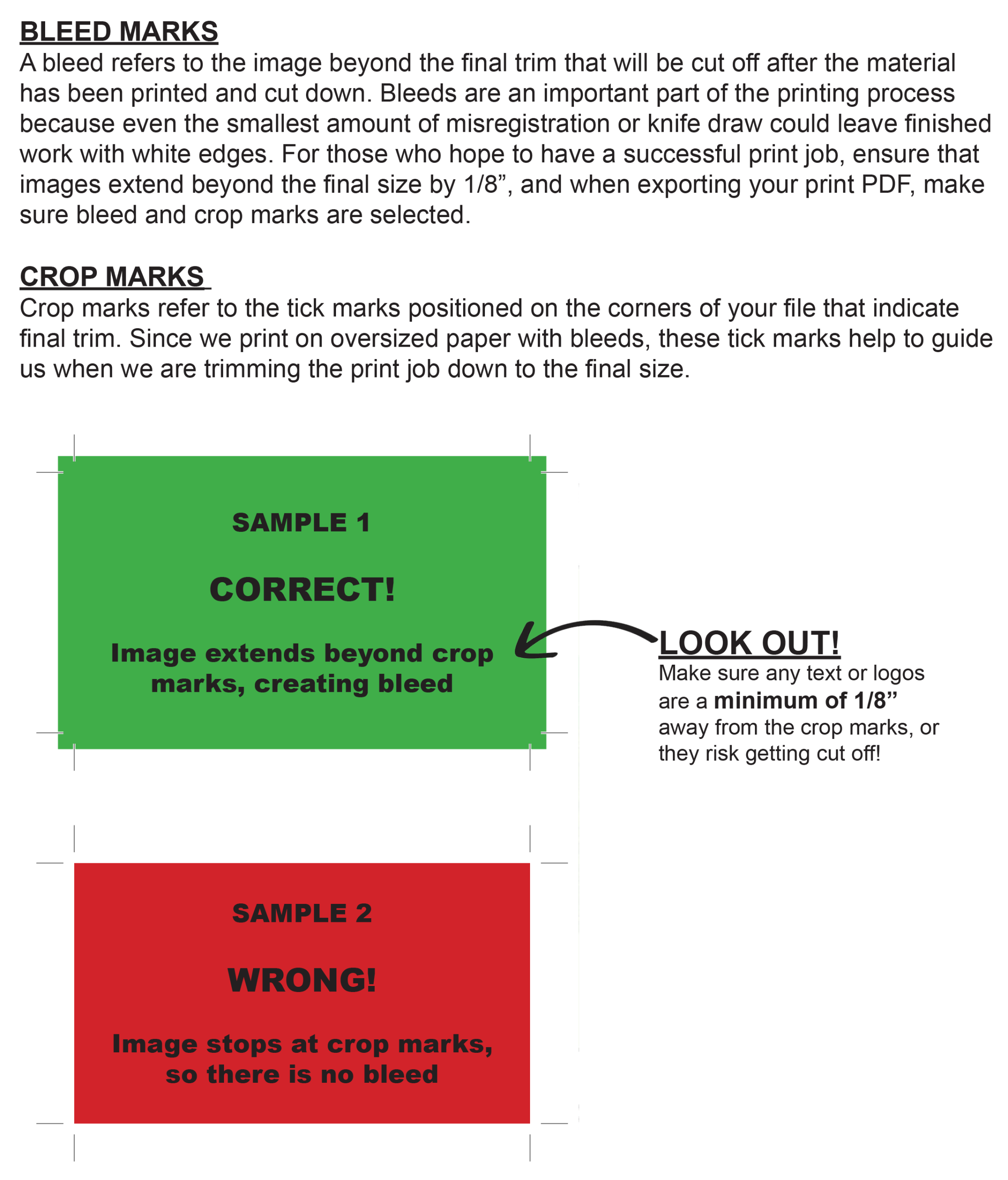
BLEED MARKS
If your artwork has any text, graphics or images that need to run to the edge of the page, this is known as ‘bleed’. As printing machines cannot put ink right to the edge of a page, the graphic is to be extended slightly on all sides, printed on a larger sheet, then trimmed down to the final size.
The industry standard for bleed is 1/8” on all sides. Having artwork that bleeds will incur an additional charge due to the additional processes involved.A bleed refers to the image beyond the final trim that will be cut off after the material has been printed and cut down. Bleeds are an important part of the printing process because even the smallest amount of misregistration or knife draw could leave finished work with white edges. For those who hope to have a successful print job, ensure that images extend beyond the final size by 1/8”, and when exporting your print PDF, make sure bleed and crop marks are selected.
CROP MARKS
Crop marks refer to the tick marks positioned on the corners of your file that indicate final trim. Since we print on oversized paper with bleeds, these tick marks help to guide us when we are trimming the print job down to the final size. IMPORTANT: Make sure any text or logos are a minimum of 1/8” away from the crop marks, or they risk getting cut off!
For adding bleed & crop marks in Canva, please follow this link.
3 SENDING FILES
Up to 82 MB
Attach files to the order form below.
Above 82 MB
Upload to our Web FTP site
Please remember to fill out the upload form with your name, company, email address and instructions.
Upload may take a few minutes depending on the size of your files
Or, bring into shop on a USB stick.
4 COMMON NORTH AMERICAN PAGE SIZES ACCORDING TO PRINT MACHINE
Digital Colour Press
Letter size – 8.5 x 11″
Legal size – 8.5 x 14″
Tabloid – 11×17″
Oversize Tabloid – 12×18″
Large format colour laser printer
3 roll sizes – 36 inch, 30 inch, 24 inch
36×24″ – 36×48″ – 24×18″
Page tiling also available for oversize prints.
5 COLOUR ACCURACY
Please note we print in CMYK. The digital press can process files sent as RGB but be aware that CMYK colours are not able to reproduce RGB colours exactly as seen on screen. If you are using software where you have a choice, save your file in CMYK.
6 BOOKLETS ON DIGITAL PRESS
Booklets can be produced on the digital press without bleeds. Common page sizes for booklets are 8.5X11, 5.5X8.5, and 7X8.5. Page count must be in multiples of 4. No need to do impositioning, just send a multi-page pdf with the pages at one of the above mention final page size and the digital press will create the booklet imposition. DO NOT save as booklet format in your software.